v0.7: Answer Claude Code by Voice
My Transcriber 0.7 lets a Claude Code session ask you something out loud. A small panel opens with the question on it, you talk for as long as you need in whatever language you speak, press Done, and what you said lands in that session as text, transcribed on your own computer. It's out now for Mac and Windows.
Why I wanted it
It usually starts when there are more than five things to answer at once, or a document to review, and instead of typing in my feedback and comments I'd rather just say them. Until now that meant opening Apple's Voice Memos, hitting record, talking freely, stopping, and hoping Voice Memos would transcribe it so I could copy the transcript into Claude. When it didn't, or when I'd been talking in a language Voice Memos doesn't transcribe, I waited for My Transcriber to do it, ten to twenty seconds, and then copied and pasted that into Claude Code. It's not bad, but it's twenty extra seconds every time, unnecessarily.
How it works
The mytranscriber plugin for Claude Code has a new skill, /mytranscriber:listen.
You can type it yourself, or Claude can offer it when the answer it needs is long or hard to
type, like how you want something built or what you think of what it just made. The session
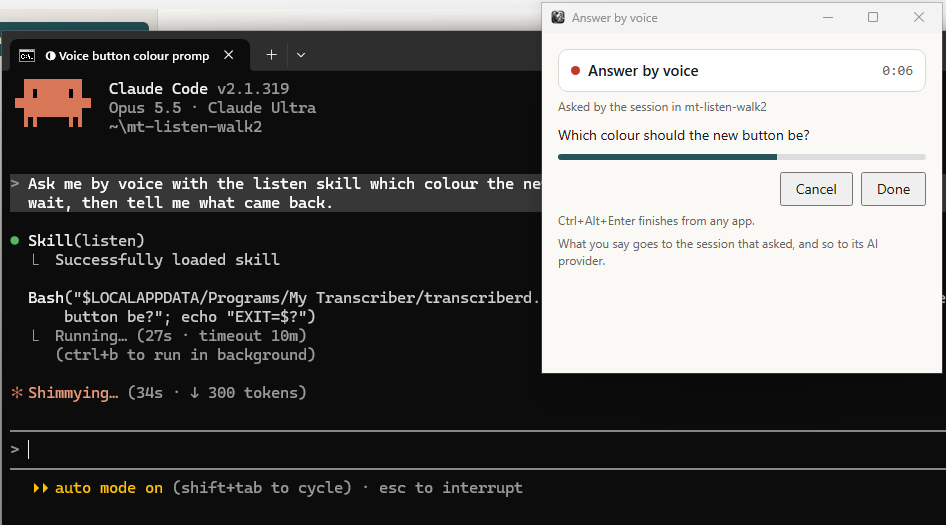
opens My Transcriber's recording panel with its question on it and the name of the folder
it's working in, and the recording starts. You talk, then press Done, or ⌥⌘↩ on a Mac and
Ctrl+Alt+Enter on Windows, which work from any app (Esc cancels). Whisper transcribes the
recording on your computer, the text comes back to the session, and it carries on with your
words as if you had typed them. By default it runs in the background, so Claude can keep working
on whatever doesn't depend on your answer while you talk.
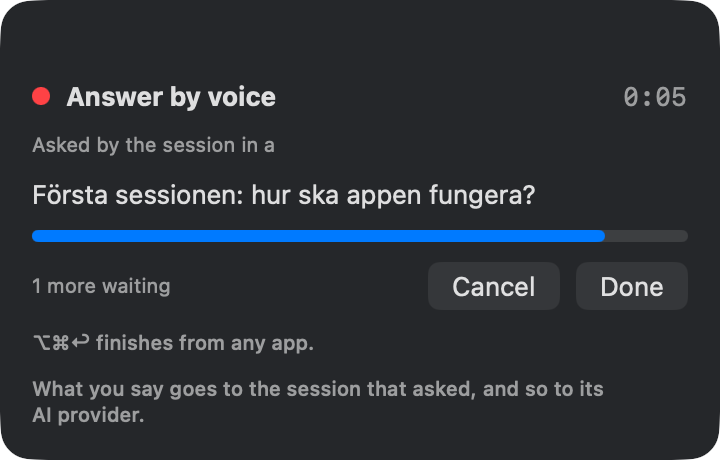
If two sessions ask at once, the second waits its turn (the panel says "1 more waiting") and opens as soon as you're done with the first, and each gets its own answer. On a Mac in our tests, a four and a half minute answer in Swedish came back 27 seconds after Done. On Windows the time depends a lot on the machine and can be much longer.
And /voice?
Claude Code has its own dictation, /voice. In tap mode it stops after two minutes,
or after fifteen seconds of silence, your audio is streamed to Anthropic's servers to be
transcribed, and it knows twenty languages and uses English when the language isn't set. The
panel has no time limit, works out the language of each recording by itself, keeps the audio on
your computer, and the session can ask for it rather than waiting for you to start it. What you
say does go to the session that asked, and so to your AI provider, the same as anything you type
there (the panel says so too), and what the session does with it is your responsibility.
Getting it
If you already have My Transcriber, let it update itself or choose Check for Updates in its menu. The new skill is in the plugin's 0.4.0, which you get from a terminal with
claude plugin marketplace update generativereality
claude plugin update mytranscriber@generativereality
If you're new, download My Transcriber for Mac or Windows from mytranscriber.app/download (it's free), and add the plugin in Claude Code:
/plugin marketplace add generativereality/plugins
/plugin install mytranscriber@generativereality
Then type /mytranscriber:listen in any session and say what you wanted to say.
Fixed
On first run, choosing "Skip the question" and then "All set, let's go" took you back to the first screen instead of finishing. It finishes now.
My Transcriber
Free. Local. Private. macOS 14+.
Not sure which? Apple menu → About This Mac. "Chip: Apple M..." = Apple Silicon. "Processor: Intel..." = Intel.
Stay updated
Get notified when we publish new posts. Sign up and we'll send updates straight to your inbox.